NuExtract3: The Reasoning Open-Source OCR & Structured Extraction LLM

Alexandre Constantin
Machine Learning Scientist

Nathan Fradet
Machine Learning Scientist

Sören Dréano
Machine Learning Engineer

Etienne Bernard
Co-Founder & CEO
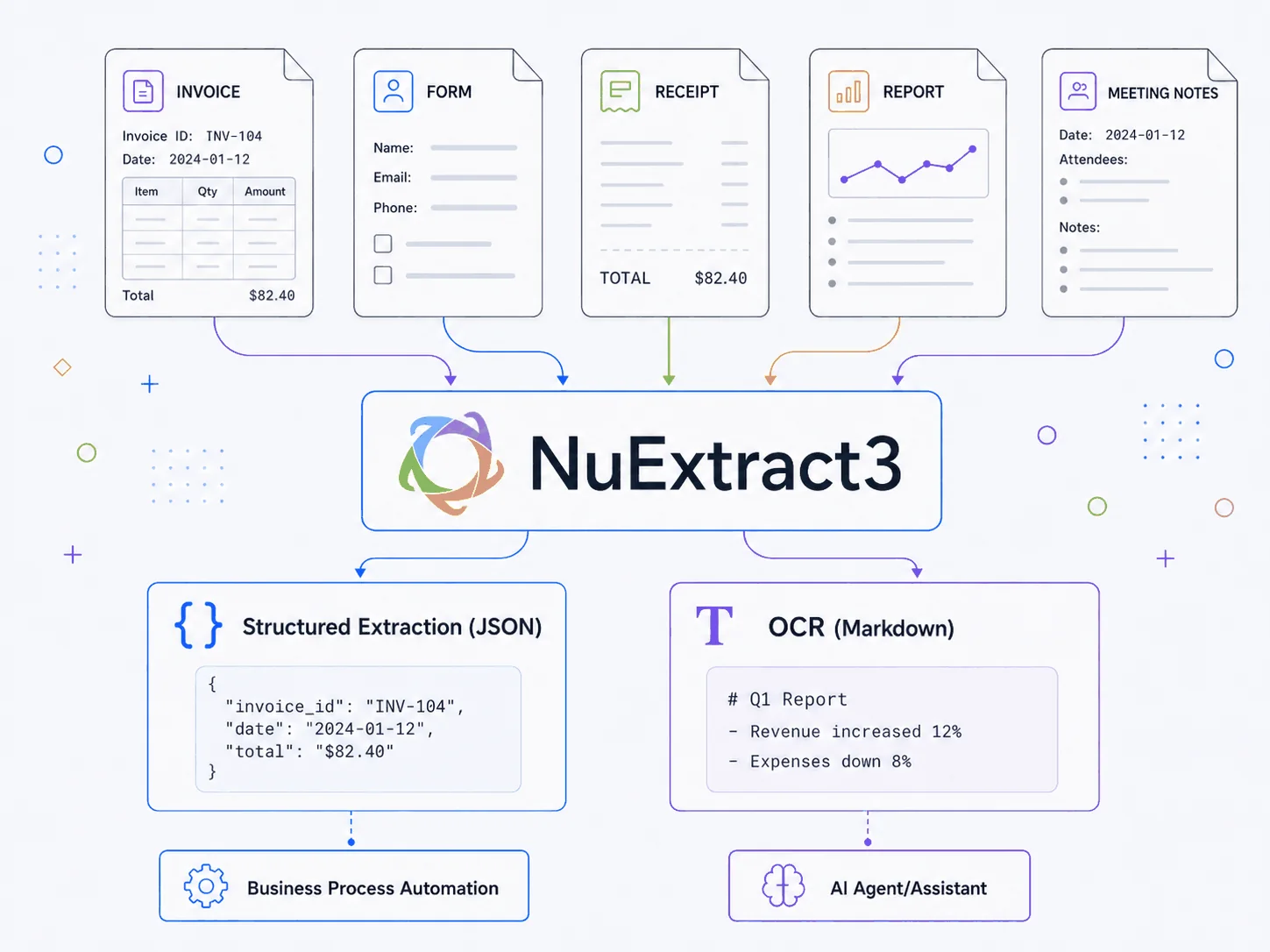
We introduce NuExtract3, a 4B open-source VLM specialized in document extraction. NuExtract3 unifies structured extraction (documents to JSON) and content extraction (OCR) into a single model. Trained via Reinforcement Learning to develop extraction-specific reasoning abilities (switchable on/off), it outperforms similarly sized models in both tasks, the new reference for open-source document extraction.
Quick Links
- 🖥️ NuExtract Platform — to use NuExtract
- 🤗 NuExtract3 on HuggingFace
- 📁 GitHub Repository — inference & fine-tuning scripts
- 🗣️ Discord — support & updates
TL;DR
- We release NuExtract3, an open-source 4B VLM specialized in document extraction.
- NuExtract3 unifies:
- Structured extraction (document to JSON via a template)
- Content extraction (document to Markdown, a.k.a. OCR)
- NuExtract3 outperforms similarly sized models in both structured and content extraction.
- Key features:
- Reasoning abilities you can turn on and off
- Support for freeform instructions
- Support for in-context examples
- 20 structured extraction field types
- NuExtract3 is based on Qwen3.5-4B, and released under Apache 2.0 license.
A Unified Document Extractor
Modern document extraction is split into two main tasks: Structured extraction and Content extraction.
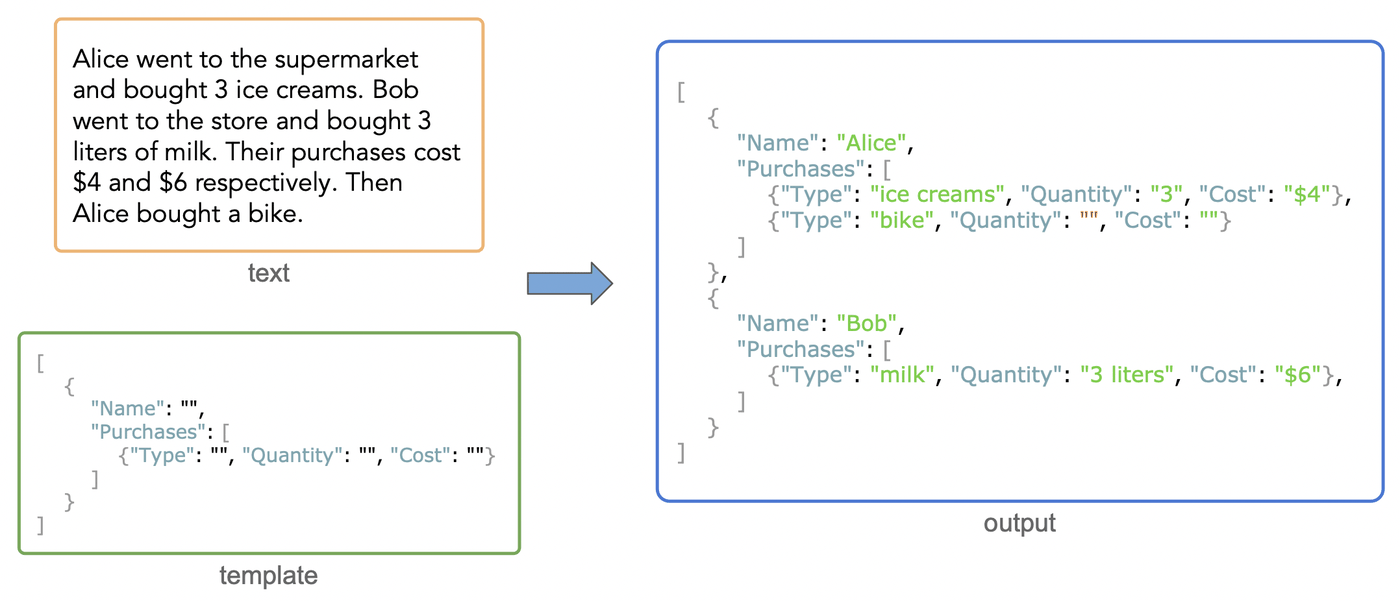
Structured extraction involves extracting specific information from a document and returning it in a computer-readable format, typically a JSON file. The extraction is defined by a schema (a.k.a. template):
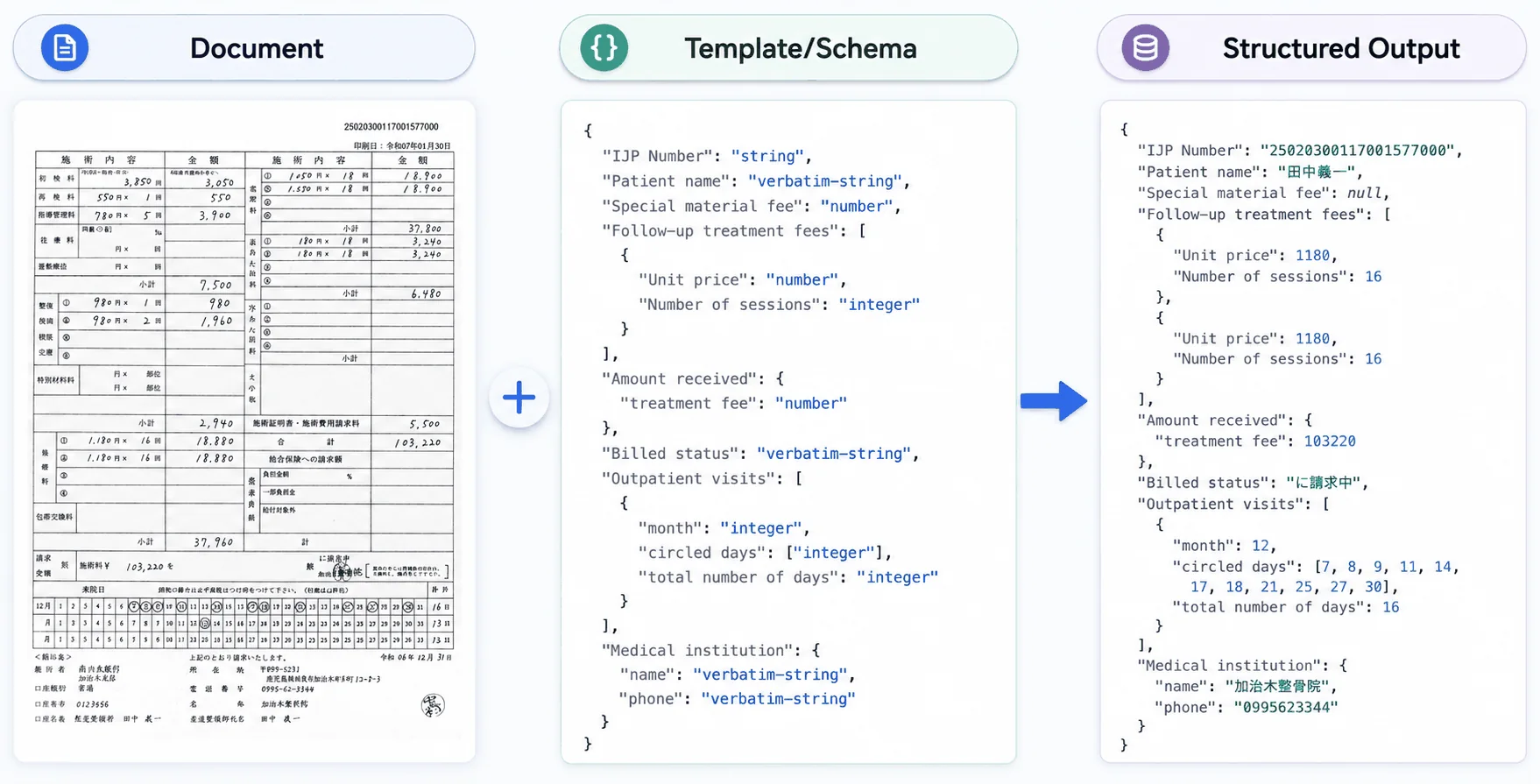
Such extraction is widely used by banks, insurance companies, and healthcare organizations to capture key information (names, addresses, amounts, etc.) from incoming documents (invoices, claims, paystubs, etc.) and enter it into their systems. In other words, structured extraction automates data entry.
Content extraction (a.k.a. OCR) is conceptually simpler. It involves extracting the document's full content and meaning into a text-based format, typically a Markdown file:
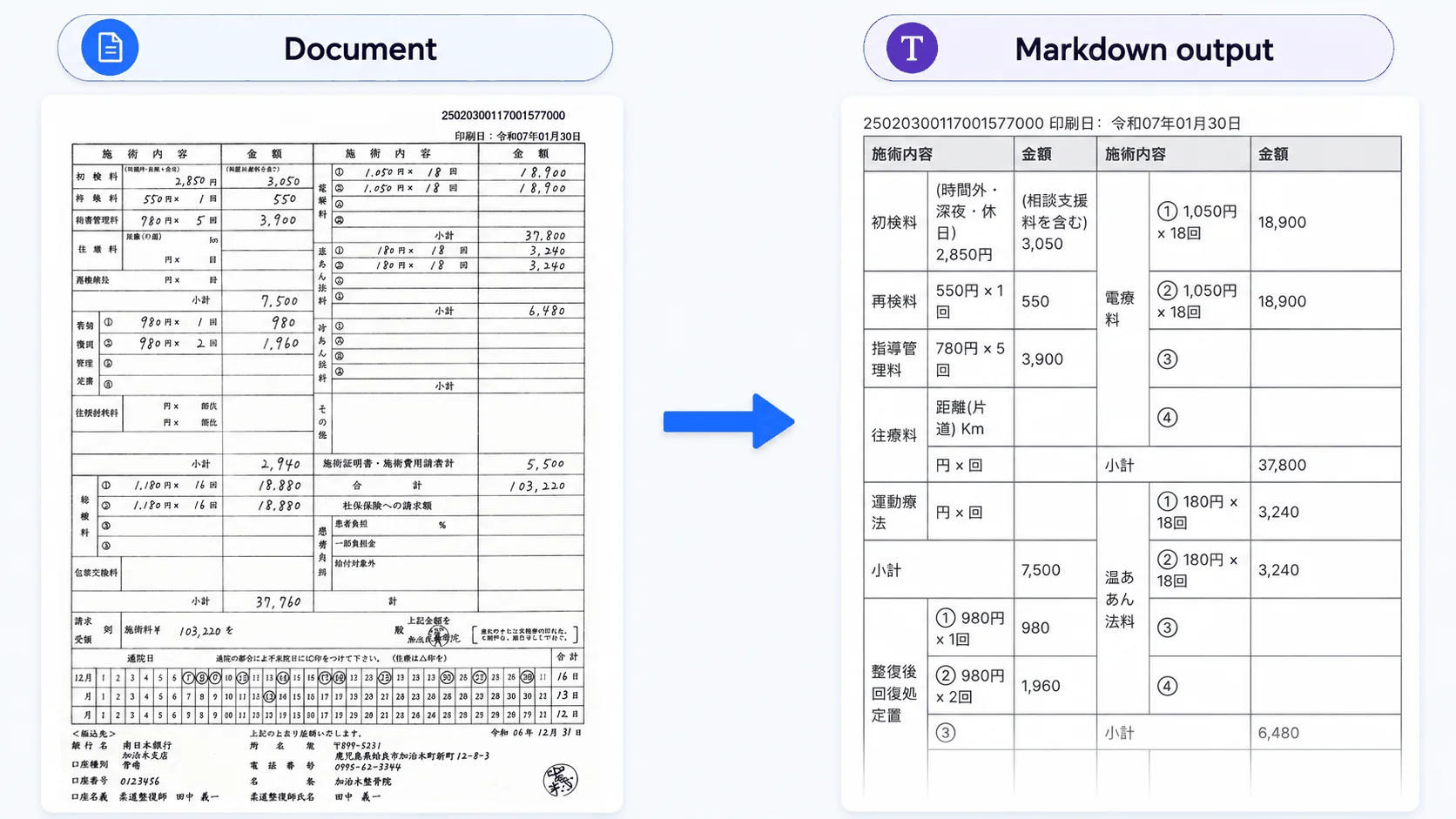
Such extraction is mainly used to pre-process enterprise documents (PDFs, scans, etc.) so they are accessible to LLMs, typically in a RAG setup. In other words, content extraction makes enterprise documents AI-ready. Note that we use the terms "content extraction" and "OCR" (Optical Character Recognition) interchangeably, but content extraction also applies to digitally native documents, not just scanned ones.
At NuMind, we've been building specialized document extraction models for the past two years. We first focused on structured extraction with our NuExtract line of models, which saw broad adoption (2M+ downloads). We then leveraged our experience building VLMs to tackle OCR and created NuMarkdown-Thinking-8B, which became our most popular model (1.5M+ downloads). We now want to pursue both directions, but with a unique line of models…
Indeed, while structured and content extraction have different applications, they rely on the same core capability: document understanding. So why not unite both tasks in a single model? As it turns out, this approach works well. We find that a unified model is more robust and performs better than models trained separately. It also simplifies deployment when you need to tackle both tasks. We therefore decided to create NuExtract3, the first unified OCR & structured extraction model.
A Reasoning Extractor
VLMs of all kinds, even the largest ones, struggle with complex documents, such as those containing handmade tables:
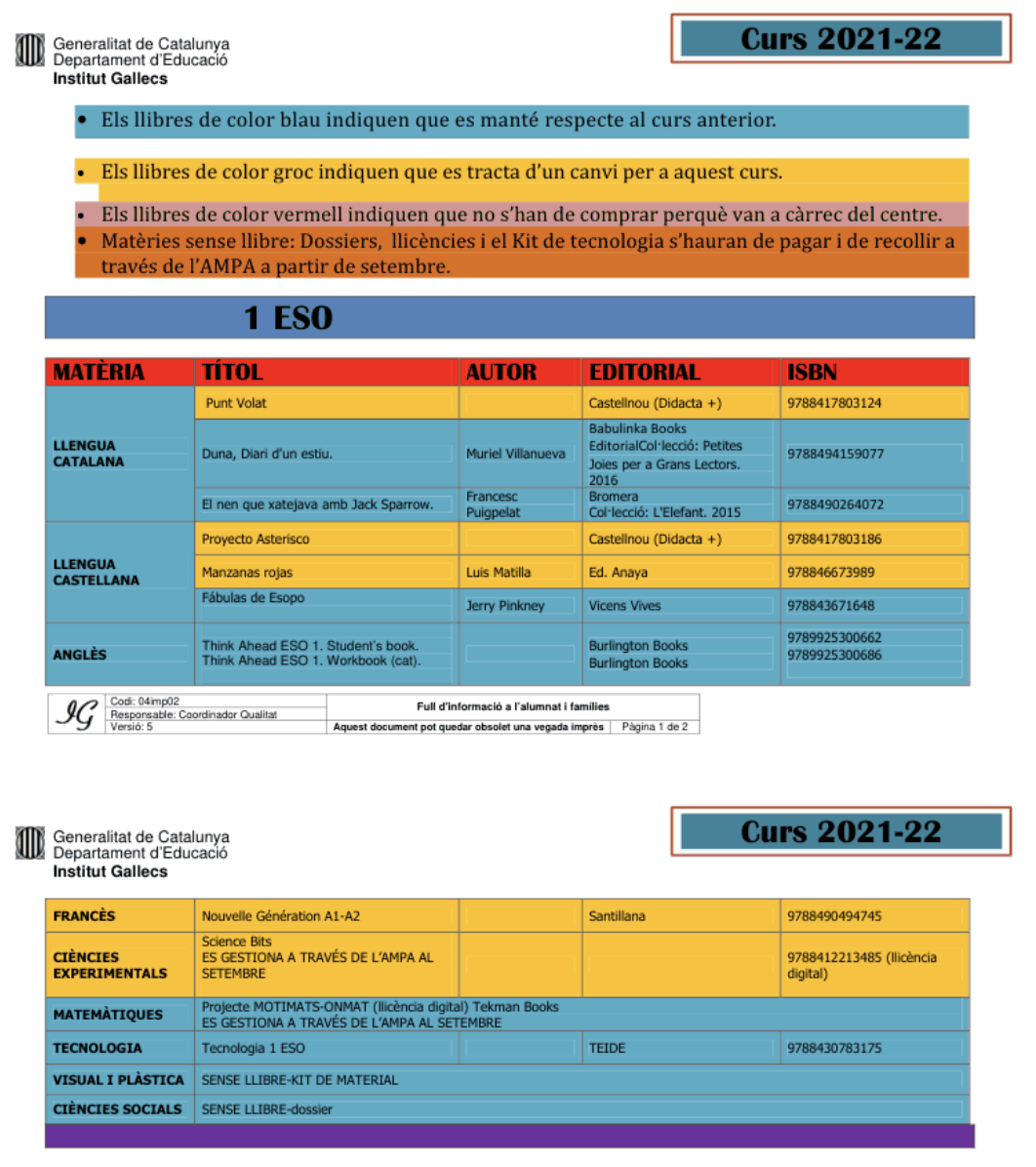
Typical issues arise when multiple tables sit side by side, when rows or columns split, or when cell content overflows into nearby cells.
To tackle these issues, we found that a reasoning approach was effective. Before providing the actual result, the model thinks "out loud" about the document, moving from the general (e.g. sections) to the specific (e.g. header names) while anticipating potential pitfalls. Here is an example of reasoning from our earlier model NuMarkdown-Thinking-8B, the first reasoning OCR model:
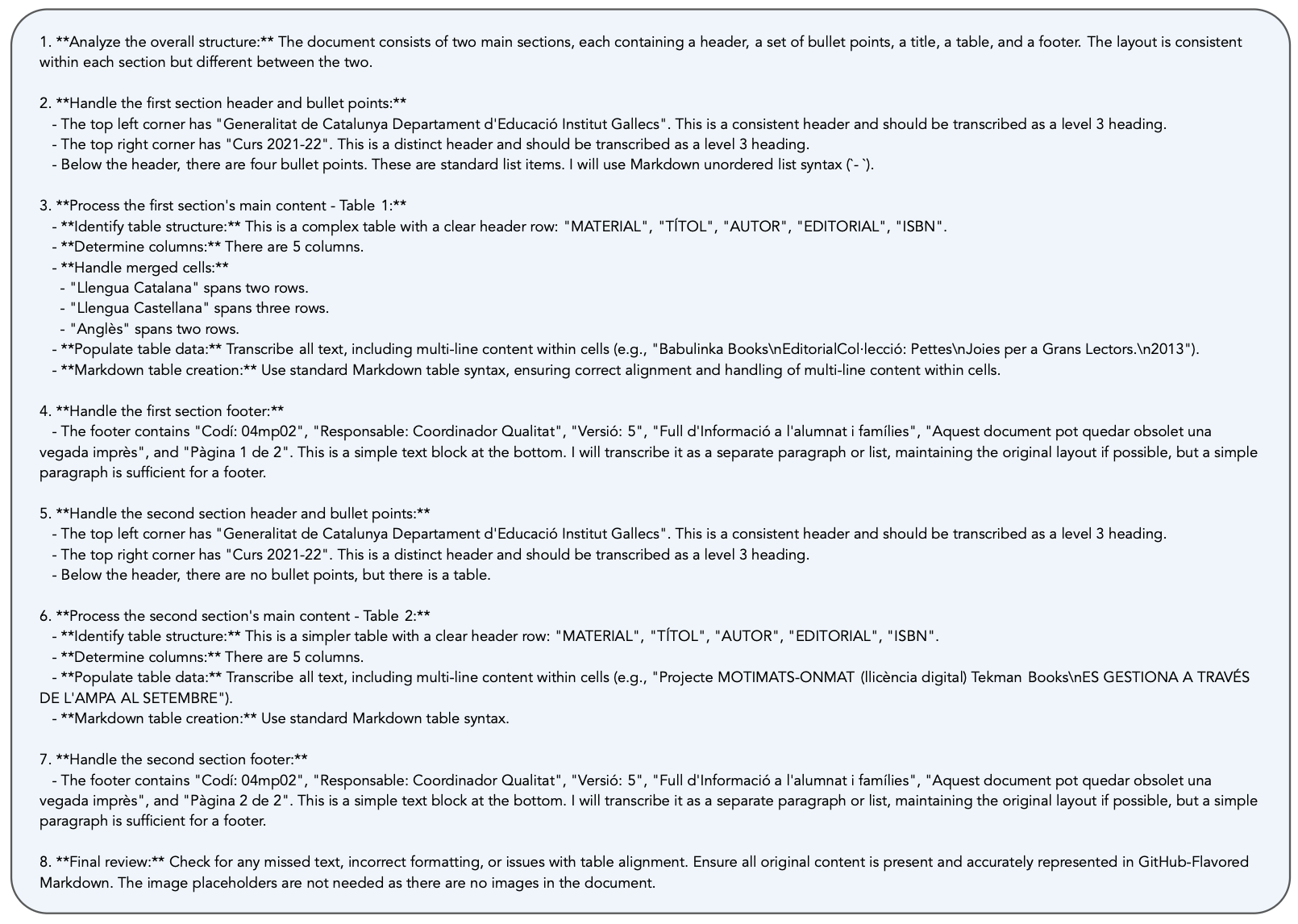
This kind of reasoning is effective at resolving document understanding issues, making NuMarkdown competitive with models that are much larger. We decided to bring this reasoning ability to NuExtract, both for OCR and structured extraction.
Reasoning, however, is not "free". It requires generating thinking tokens for each extraction, which increases cost and latency. This is a major issue with generalist models, which often generate ten times more thinking tokens than output tokens, multiplying cost and latency by the same factor. To address this, we trained NuExtract3 to use roughly the same number of thinking tokens as output tokens. We find this to be a sweet spot between extraction quality, cost, and latency. We also made it possible to turn reasoning on and off.
Making NuExtract3
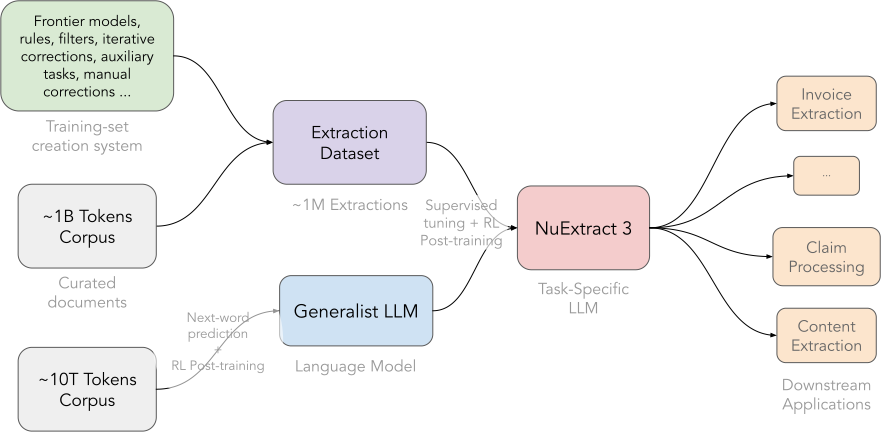
Building a task-specialized model starts with a dataset. This dataset must be both diverse and challenging. For diversity, we use real-world documents from Fine-PDF, which we automatically annotate through a range of processes, including LLMs as annotators and judges, iterative corrections, and programmatic filtering. For difficulty, we generate complex synthetic documents, which have the advantage of being perfectly annotated.
The next step is to pick a base model. We choose the open-source generalist model Qwen3.5-4B. This model has impressive general capabilities for its size, which gives us a strong starting point.
We then train the base model on our dataset in two phases. First, we use supervised learning via next-token prediction. Second, we use reinforcement learning. While the first phase is already effective at specializing the base model, the second is necessary for better template adherence and stronger reasoning abilities. Here is a summary of the process:
Structured Extraction Results
Let's now look at the quality of NuExtract3's extractions, starting with structured extraction (JSON output). To do so, we use our structured extraction benchmark, which includes about 600 challenging extractions across 15 different problems. We predict extraction trees in a zero-shot setting and compare the extracted leaf values with their ground-truth values. We use the EXTRA metric, which is essentially leaf accuracy (we are currently writing a paper about this benchmark & metric).
Here is a comparison of NuExtract3 with the best models of a similar size:
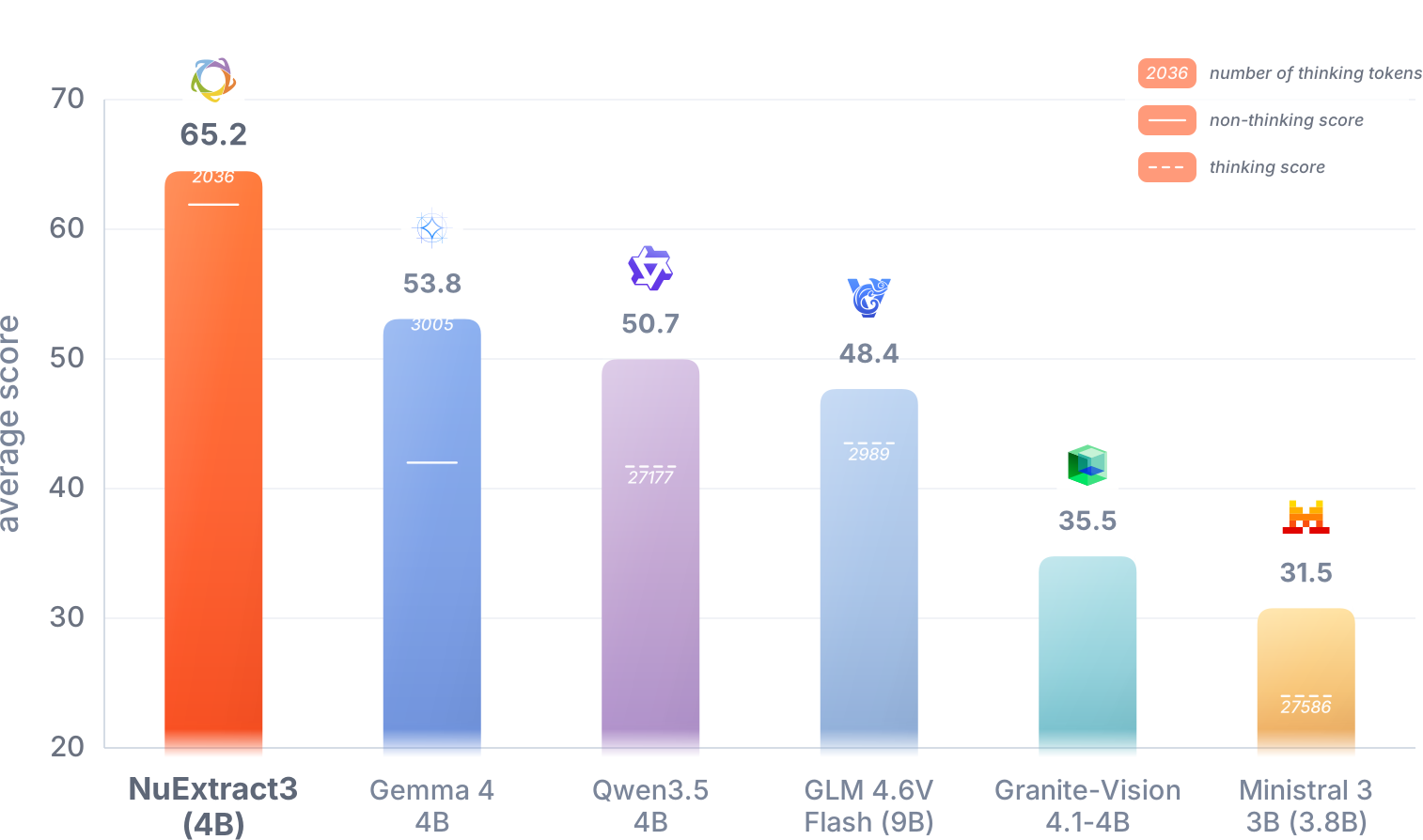
We can see that NuExtract3 outperforms generalist models substantially, beating Gemma 4 by more than 10 points. One aspect that does not work as well for such generalist models is reasoning. While it is beneficial for Gemma, it is detrimental for Qwen, GLM, and Ministral, where the thinking trace often loops. We specifically train NuExtract3's thinking via reinforcement learning, which fixes these issues.
Content Extraction (OCR) Results
Let's now evaluate NuExtract3's OCR capabilities. We want to understand how effective NuExtract3 is at preprocessing documents for an LLM to use later on.
While there are plenty of OCR benchmarks out there, we found they do not properly measure the capabilities we care about. They either focus on character recognition, like OCRBench v2, on preserving document layout, like OmniDocBench, or, like olmOCR-Bench, on preserving document semantics via hand-crafted programmatic metrics, which can lead to suspicious results, like Qwen3.5 2B scoring higher than Gemini 3.1 Pro. We thus decided to figure out another way to test these models.
As a first baseline, we use a frontier LLM as a judge (Gemini 3.1 Pro with maximum thinking) to compare models. We provide a pair of Markdown outputs and ask the judge to tell which one is best via this naïve prompt:
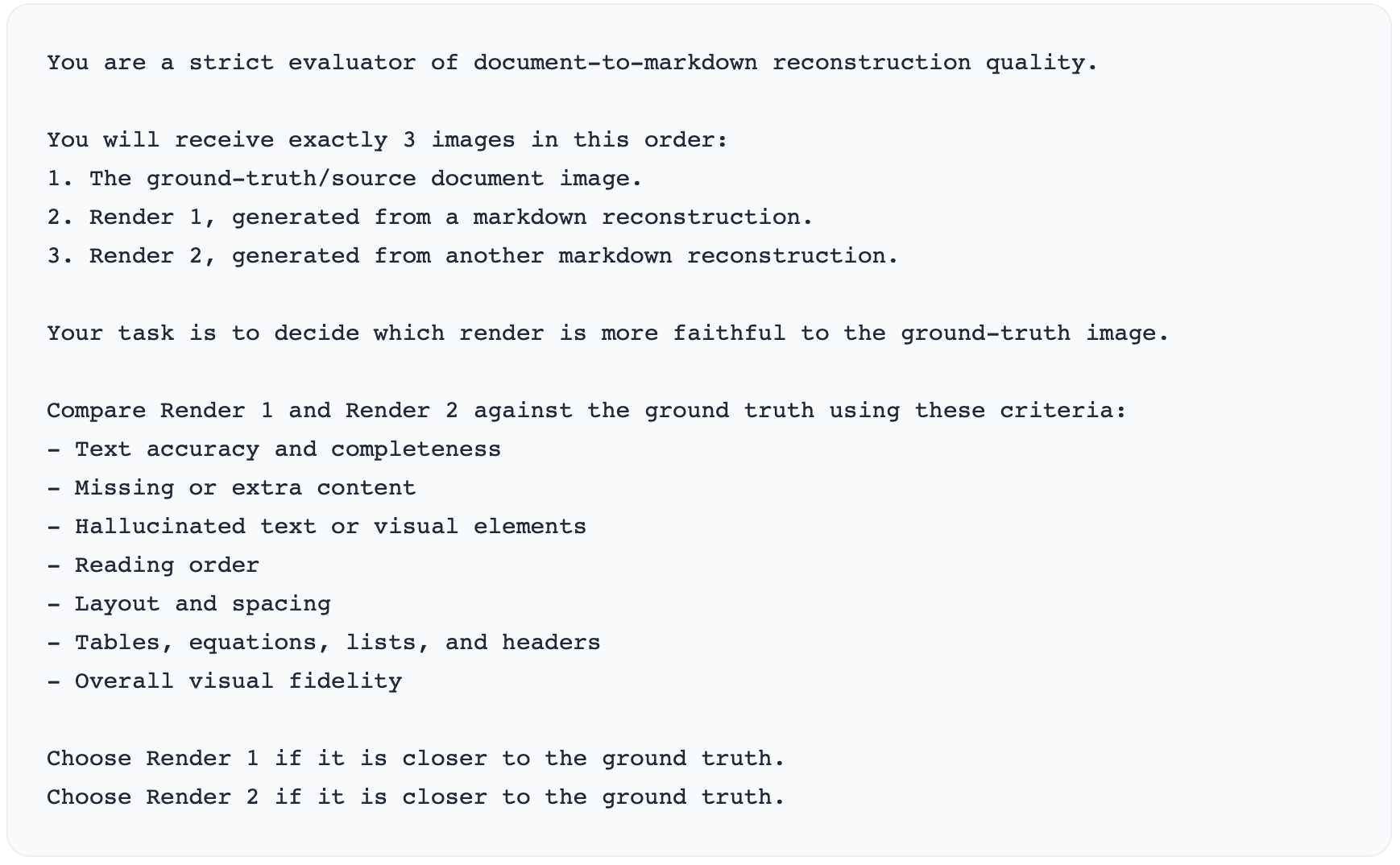
We use 150 complex documents (mostly weird tables) and compare extracted markdowns between NuExtract3 and models of similar size, both generalist and specialized. Here is the win rate of these models against NuExtract3:
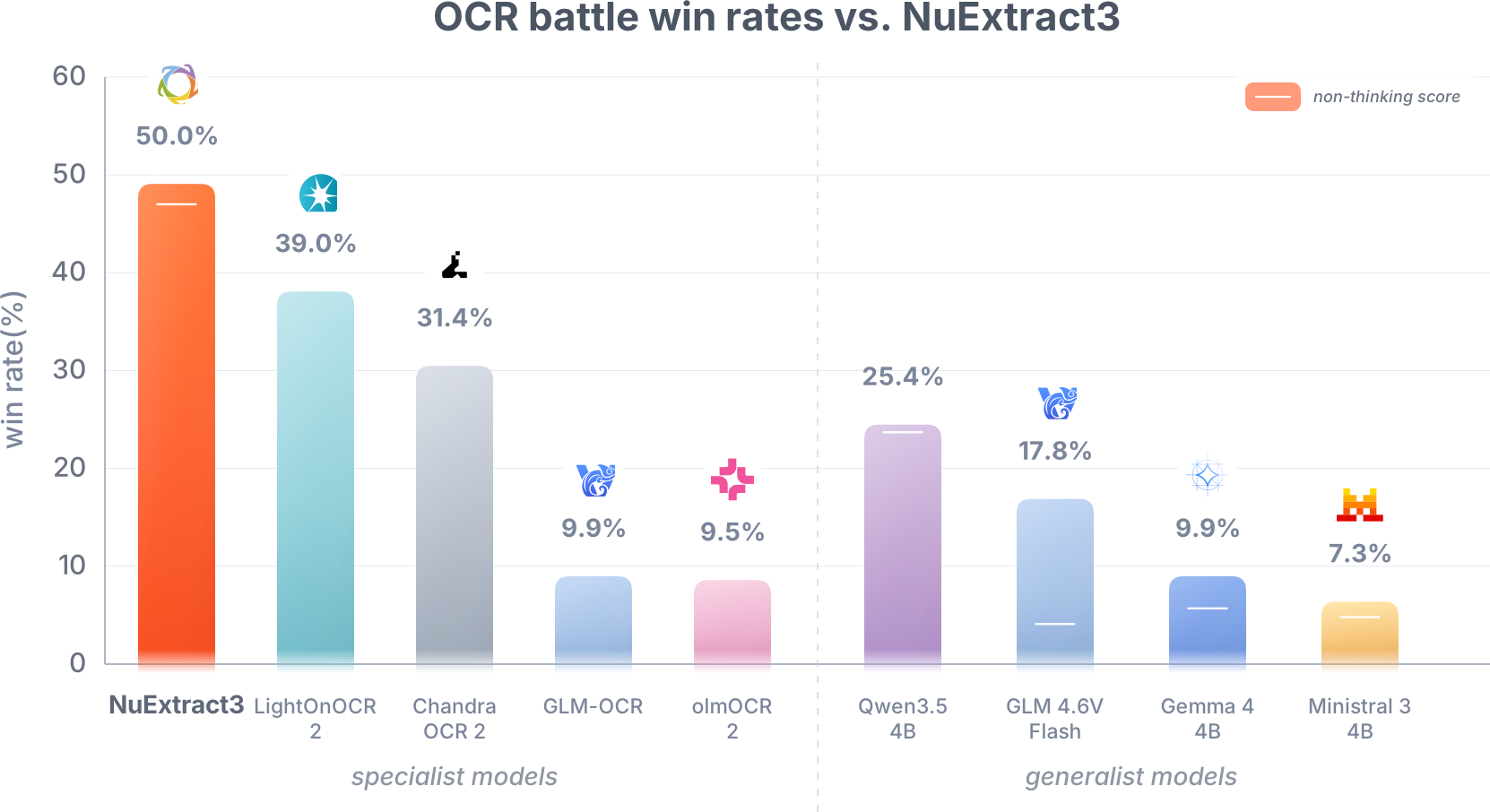
Like in the case of structured extraction, NuExtract3 largely outperforms generalist models at content extraction, showing once again the usefulness of specialized models. NuExtract3 also scores higher than specialist models, although LightOnOCR 2 and Chandra OCR 2 score pretty high for their size.
This "OCR-battle benchmark" gives a first view of NuExtract3 capabilities, but it has many flaws: it only includes 150 documents, the LLM judge is not perfect, and, importantly, we baked-in handcrafted features to define what a "good Markdown extraction" is, which is human-biased. For example, this benchmark could be too sensitive to styling as opposed to extracting a useful Markdown. We believe there is a much better way to test OCR abilities…
The "obvious" thing to do would be to evaluate these OCR models based on how well an LLM can use their Markdown outputs to answer questions, since that is their purpose. However, this is not easy: you would need a large set of high-quality questions, one LLM to answer them, and another LLM to evaluate the answers. One way to simplify this could be to ask simple questions with answers that can be verified programmatically, removing the need for an evaluator. As it turns out, this is exactly what structured extraction is, and we already have a benchmark for that.
We thus decided to repurpose our structured extraction benchmark to measure OCR capabilities. For each model, we extract Markdown files for all 600 documents in the benchmark, then use a standard LLM (Qwen3.6 27B here) to extract structured information from the Markdowns. This provides us with around 100k extracted leaf values to test the model on. We then compare these values to the ground truth using the EXTRA metric (essentially, leaf accuracy). This testing approach is free of styling bias: it directly measures how useful the results are for an AI. We believe that this is the current best way to test OCR models. Here is what we obtain:
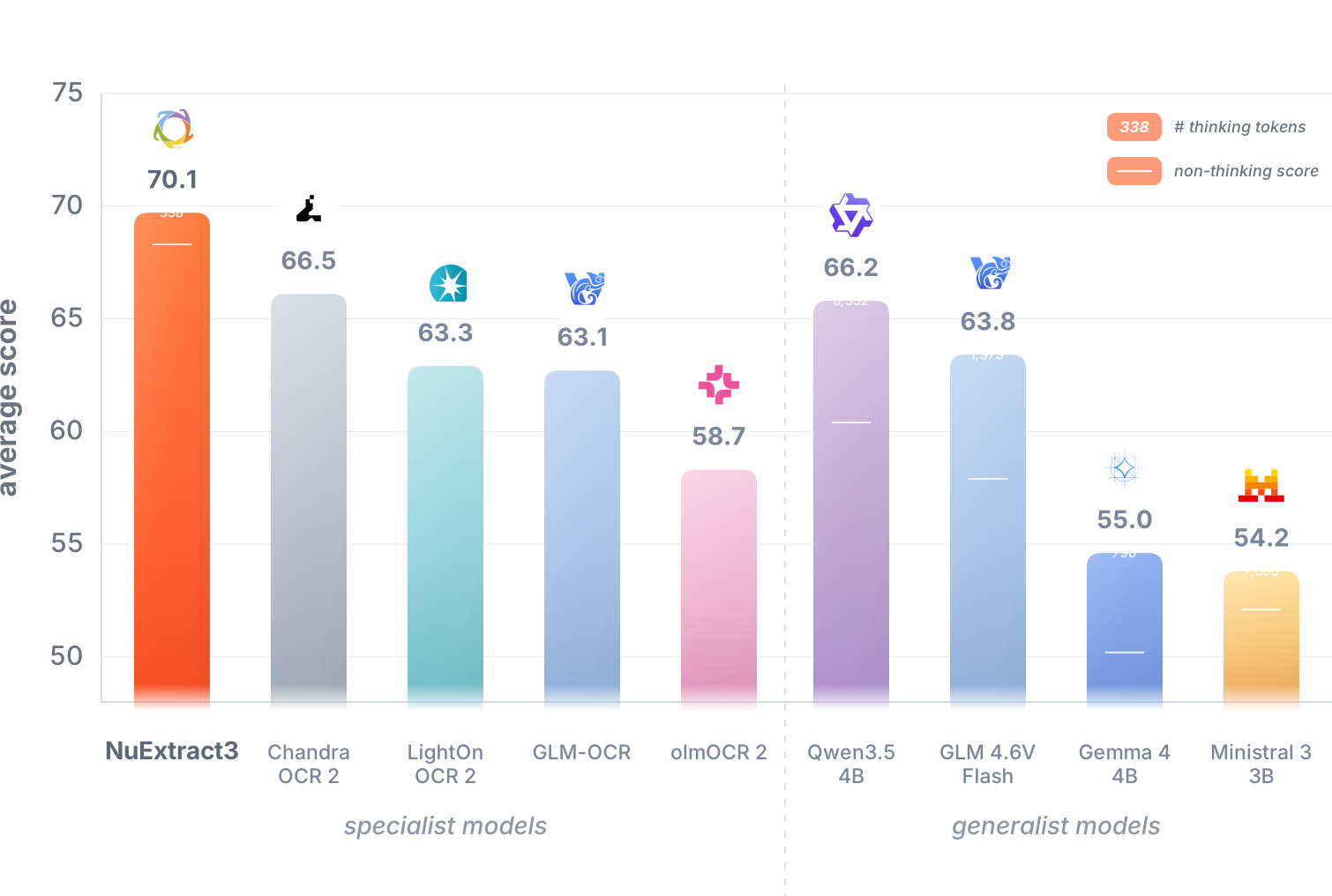
We can see that NuExtract outperforms both generalist and specialist models while using an average of only 338 thinking tokens. Generalist models compete with the specialized ones, but at the cost of a high number of thinking tokens (an average of 6,552 for Qwen and 1,973 for GLM). We can see the benefits of reasoning for this task. NuExtract would likely benefit from generating more thinking tokens before answering; we were probably too aggressive in penalizing thinking tokens in this version.
It is interesting that generalist models perform much better here than in the OCR battles. We believe this is partly due to styling bias in the judge LLM. In the end, we do not care about reproducing the exact document layout. We only care about preserving the information and making it easy to process.
New Field Types (Structured Extraction)
NuExtract 2.0 introduced field types in the template:
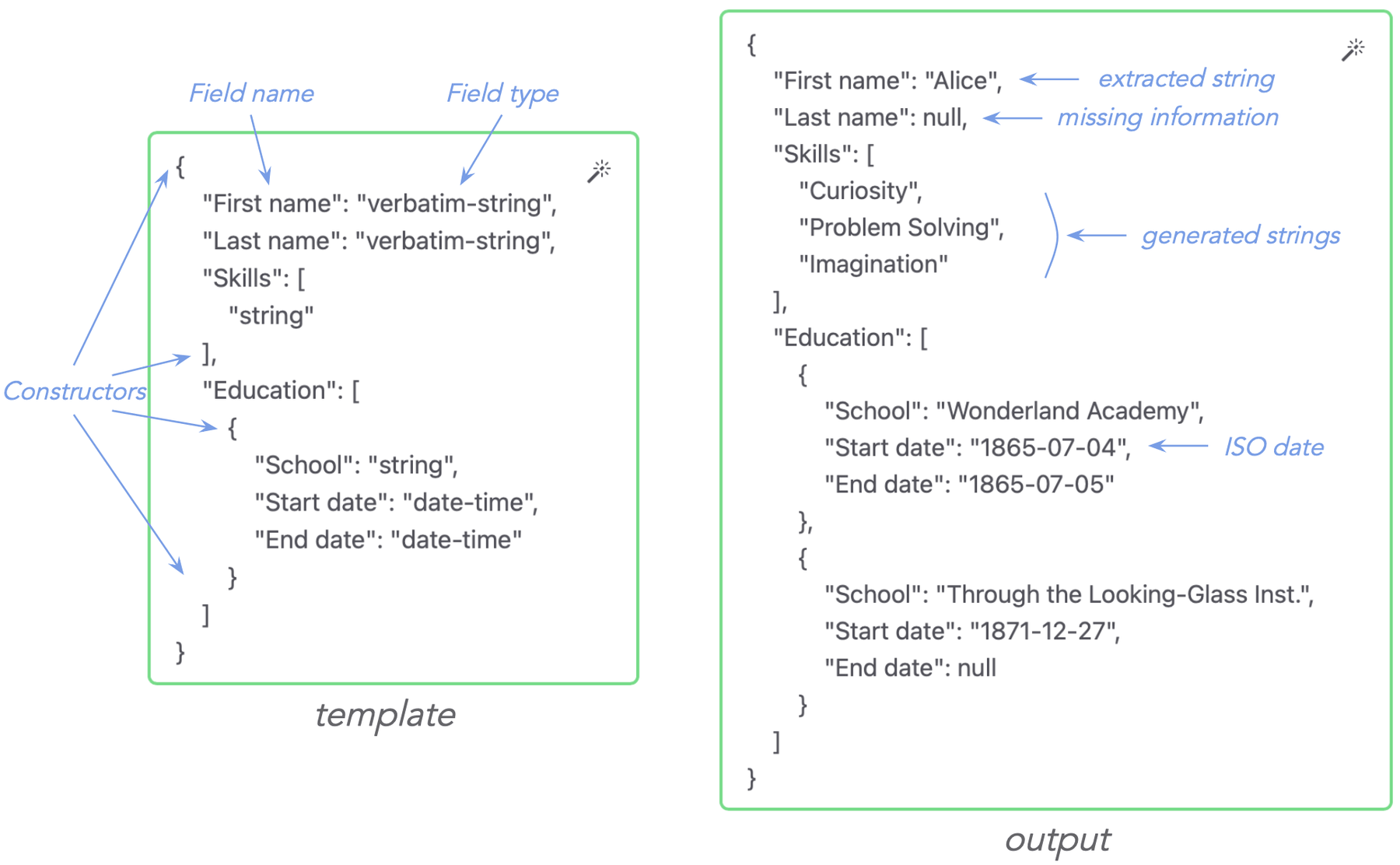
There were 7 possible types, and notably "verbatim-string", which tells the model to extract without any reformulation, reducing hallucinations:
| Type | Description | Example |
|---|---|---|
"verbatim-string" | copy-pasted string from input document | "John" |
"string" | any string | "USD" |
"integer" | a whole number | 8 |
"number" | a whole number or a decimal number | 1.39 |
"boolean" | true or false | true |
["x_1","x_2",…] | Choice between strings "x_1", "x_2", etc. | "Large" |
"date-time" | date and/or time in ISO 8601, as a string | "2023-03-25T04:32:17" |
NuExtract3 introduces 14 new types:
| Type | Description | Example |
|---|---|---|
"date" | date in ISO 8601 | "2023-03-25" |
"time" | time in ISO 8601 | "04:32:17" |
"duration" | duration in ISO 8601 (PnYnMnDTnHnMnS) | "P2Y1M3D" |
"country" | country in ISO 3166-1 | "FR" |
"currency" | currency in ISO 4217 | "EUR" |
"language" | language in ISO 639-3 | "eng" |
"language-tag" | IETF language tag | "en-US" |
"url" | IRI in RFC 3987 | "http://www.example.com/" |
"email-address" | email address in RFC 5322 and RFC 6531 | "用户@例子.公司" |
"phone-number" | phone number as a sequence of digits or in ITU E.164 | "+14155552671" |
"iban" | IBAN in ISO 13616-1 | "DE89370400440532013000" |
"bic" | BIC in ISO 9362 | "BNPAFRPPXXX" |
"unit-code" | UCUM unit code | "m" |
"region:XX" | Regions of a given country. "XX" can be "US", "FR", etc. | "MA" |
These types allow for more precise control over how extracted values are represented, which reduces the need for post-processing.
Model Instructions
With NuExtract 2.0, the only way to improve structured extraction performance was to add in-context examples or do some "template engineering", which consists of adding or modifying field names. This sometimes resulted in long field names like "card_access_number//The one on the bottom right", which uses additional tokens.
For NuExtract3, we added the ability to provide additional instructions to the template. For example, let's say you want to extract the "card access number" from this ID card:
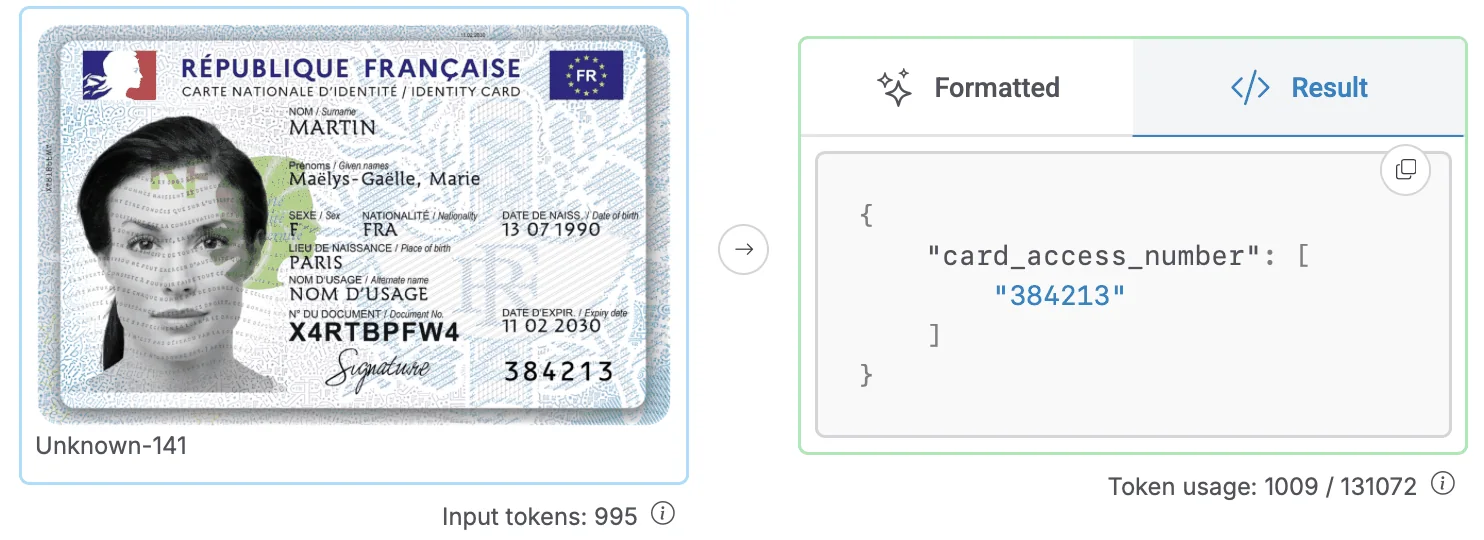
Instead of putting additional information in the field name, you can add it in the instructions, such as "The card access number is 6 digits and generally located at the bottom right of the card.", which helps distinguish this number from the document number.
Model instructions were a highly requested feature and, while we are not totally satisfied with how they are followed by the model, we find using instructions extremely useful.
Long live NuExtract 3!
That's it for this release. NuExtract3 shows that a specialized model can lead its category in both structured extraction and OCR. We hope that this model will be useful for your projects. As usual, please share feedback on what we should prioritize for NuExtract4 (model confidence? bounding boxes? instructions for content extraction?).